
Download Botika – Automated Fashion Product Photography for E‑commerce
Introduction
In today’s hyper‑competitive fashion e‑commerce landscape, visual storytelling is the single most decisive factor that drives a shopper from browsing to checkout. Brands that can showcase garments on realistic models, in diverse settings, and at a rapid pace often enjoy higher conversion rates and lower return percentages. However, traditional product photography demands studio rentals, professional models, photographers, stylists, and post‑production teams—all of which translate into significant time and financial investment.
Botika enters the scene as a purpose‑built AI solution that eliminates these barriers, offering an on‑demand, scalable, and secure way to generate high‑quality fashion imagery. Whether you run a boutique with a few dozen SKUs or a global retailer with tens of thousands of items, Botika’s cloud‑native platform promises to streamline your visual workflow, reduce costs, and keep your catalog fresh in real time. This review explores Botika’s core capabilities, walks through the onboarding process, evaluates its strengths and weaknesses, and answers the most common questions asked by fashion merchants considering an AI‑driven photography tool.
Overview
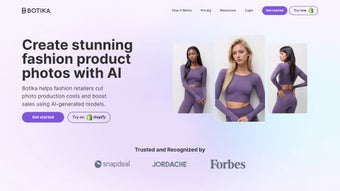
Botika is a next‑generation Generative AI platform designed specifically for clothing brands, boutique retailers, and large‑scale fashion e‑commerce operators. In a market where high‑quality visual content directly influences conversion rates, Botika removes the traditional bottleneck of on‑model photography by creating hyper‑realistic, AI‑generated models that showcase garments in a variety of poses, body types, and ethnic backgrounds. The service eliminates the need for costly photo‑shoots, studio rentals, and extensive retouching, allowing merchants to launch new collections within hours rather than weeks. Botika’s engine combines deep‑learning image synthesis with an intuitive web‑based editor, giving users full control over lighting, background, and styling while maintaining brand consistency. Whether you need a clean white‑background product shot, a lifestyle scene, or a runway‑style lookbook, Botika can generate the image instantly and at scale.
The platform also supports bulk uploads, so thousands of SKUs can be transformed with a single click, making it ideal for fast‑fashion cycles and seasonal drops. By leveraging Botika, retailers not only cut production costs but also gain flexibility to test multiple visual concepts, target different demographics, and respond to market trends in real time. The result is a faster time‑to‑market, higher engagement, and ultimately a stronger bottom line for any fashion‑focused e‑commerce operation. In addition to its core imaging engine, Botika offers analytics dashboards that track image performance, allowing marketers to tie visual changes directly to conversion metrics and iterate quickly.
Key Features
Botika packs a comprehensive set of capabilities that address the entire lifecycle of fashion imaging—from creation to distribution. The following list outlines the most impactful functionalities, and each item is designed to be both technically robust and easy for non‑technical users to adopt.
- AI‑Generated Models: Choose from a diverse library of virtual models representing various body shapes, skin tones, and ages, ensuring inclusive representation for every collection.
- Instant On‑Model Visualization: Transform flat product photos into on‑model images within seconds, eliminating the need for physical photo shoots.
- Customizable Backgrounds & Settings: Select from studio, street, runway, or custom backdrops; adjust lighting, shadows, and camera angles to match brand aesthetics.
- Bulk Processing Engine: Upload CSV or spreadsheet files to generate images for hundreds or thousands of SKUs simultaneously, saving hours of manual work.
- High‑Resolution Output: Export images at up to 4K resolution, ready for web, mobile, or print catalogs without loss of detail.
- Brand Consistency Tools: Save style presets, color palettes, and model selections to maintain a uniform visual identity across all product lines.
- Real‑Time Preview & Editing: View generated images instantly, make on‑the‑fly adjustments, and approve final assets with a single click.
- Secure Cloud Storage: All assets are stored on encrypted servers, complying with GDPR and CCPA standards for data privacy.
- Integration Ready: API hooks for Shopify, Magento, WooCommerce, and custom CMS platforms enable seamless workflow automation.
- Cost‑Effective Pricing: Subscription tiers based on image volume, with a free trial that includes 50 generated images.
Beyond the individual features, Botika’s architecture ensures that each component works together fluidly. For example, the brand‑consistency presets can be applied automatically during bulk processing, guaranteeing that every image—whether generated individually or in a batch—adheres to the same visual language. The secure cloud storage also means that teams can collaborate across locations without worrying about data breaches, and the API integration shortens the time needed to push new images to live product pages.
Installation & Usage Instructions
Getting started with Botika is intentionally simple, allowing both tech‑savvy marketers and non‑technical store owners to harness AI‑driven photography without a steep learning curve. Follow these steps to begin generating on‑model images for your catalog:
- Create an Account: Visit the Botika website and click “Sign Up.” You’ll be prompted to enter a business email, set a password, and verify your account via a confirmation link.
- Select a Subscription Plan: After verification, choose a plan that matches your projected image volume. The free tier provides 50 images, ideal for testing the platform.
- Upload Source Images: Navigate to the “Upload” tab. Drag‑and‑drop flat product photos (PNG or JPEG) or use the bulk uploader to submit a CSV file containing image URLs and SKU references.
- Configure Model & Scene: In the editor, pick a virtual model from the library. Adjust body type, pose, and ethnicity to align with your target demographic. Choose a background—studio, street, or custom—and fine‑tune lighting sliders for shadows and highlights.
- Apply Brand Presets: If you have pre‑saved style presets (e.g., brand color palette, specific camera angle), apply them now to ensure visual consistency across all generated assets.
- Generate Images: Click “Render.” Botika’s AI engine processes the request in real time, typically delivering results within 10‑30 seconds per image depending on resolution.
- Review & Edit: Use the side‑by‑side comparison view to assess the AI‑generated output against the original flat photo. Minor tweaks—such as adjusting garment fit or background blur—can be made instantly.
- Download or Sync: Once satisfied, download the high‑resolution files individually or in bulk as a ZIP archive. Alternatively, enable automatic syncing to your e‑commerce platform via the Botika API, which pushes images directly to product pages.
- Monitor Usage & Analytics: The dashboard provides real‑time statistics on image generation, storage consumption, and conversion impact, allowing you to iterate on visual strategies quickly.
Botika’s cloud‑based architecture means there is no software to install on local machines; the entire workflow occurs within a secure browser session. For teams that prefer on‑premise solutions, Botika offers an enterprise‑grade Docker container that can be deployed on private servers, complete with VPN‑only access and customizable GPU allocation for faster rendering. Documentation, video tutorials, and a 24/7 support chat are available within the “Help Center” to assist users at any stage of the process.
Conclusion & Call to Action
Botika positions itself as a game‑changing tool for fashion e‑commerce, delivering on the promise of rapid, cost‑effective, and inclusive product photography. By automating what has traditionally been a labor‑intensive workflow, the platform empowers brands to stay agile, experiment with visual storytelling, and ultimately drive higher conversion rates. Below is a quick snapshot of the platform’s strengths and areas where users might need to be mindful.
Pros
- Significant cost reduction compared to traditional photo shoots.
- Instant generation of on‑model images accelerates time‑to‑market.
- Inclusive model library supports diverse brand narratives.
- High‑resolution output suitable for all digital and print channels.
- Seamless integration with major e‑commerce platforms via API.
- Secure, GDPR‑compliant cloud storage ensures data privacy.
- Scalable bulk processing for large catalogs.
Cons
- AI‑generated images may require fine‑tuning for highly intricate garments.
- Limited offline functionality unless opting for the enterprise Docker deployment.
- Subscription cost can rise for very high image volumes.
- Learning curve for brand teams unfamiliar with AI‑driven design tools.
Overall, Botika delivers a compelling blend of technology and practicality that aligns perfectly with the fast‑paced demands of modern fashion retail. If you’re ready to eliminate costly photo‑shoot logistics, boost visual consistency, and give your customers a richer shopping experience, now is the time to download Botika and start your free trial. Explore the platform, generate a few test images, and see firsthand how AI can transform your product catalog into a high‑impact visual showcase.
FAQ
Can Botika handle complex garments like sheer fabrics or intricate embroidery?
Botika’s AI model is trained on a broad range of apparel, but very fine details such as sheer textures or dense embroidery may need manual post‑processing or a higher resolution render setting to retain full fidelity.
Is there a limit to how many images I can generate per month on the free tier?
The free trial includes 50 AI‑generated images. After those are used, you’ll need to upgrade to a paid subscription to continue generating images.
Does Botika integrate directly with Shopify stores?
Yes, Botika offers a native Shopify app and API hooks that can push newly generated images directly to product pages, updating the storefront automatically.
How does Botika ensure the security and privacy of my uploaded product photos?
All files are stored on encrypted servers that comply with GDPR and CCPA regulations. Access is protected by two‑factor authentication and can be restricted to specific IP ranges for enterprise accounts.
Can I run Botika on my own servers instead of the cloud?
Botika provides an enterprise‑grade Docker container that can be deployed on private infrastructure, giving you full control over data residency and GPU resources.



.png)



